All my watch faces that use formulas such as {dh} always showed the hour from 1 to 12, for example 2:00 is 2.
Now it says it’s using 24-hour format and the result is 14.
There is no longer a way to use 2.
What’s going on? all my formulas are busted!
All my watch faces that use formulas such as {dh} always showed the hour from 1 to 12, for example 2:00 is 2.
Now it says it’s using 24-hour format and the result is 14.
There is no longer a way to use 2.
What’s going on? all my formulas are busted!
It does appear that there is no option to force the format of the Date/Time. The watch settings override.
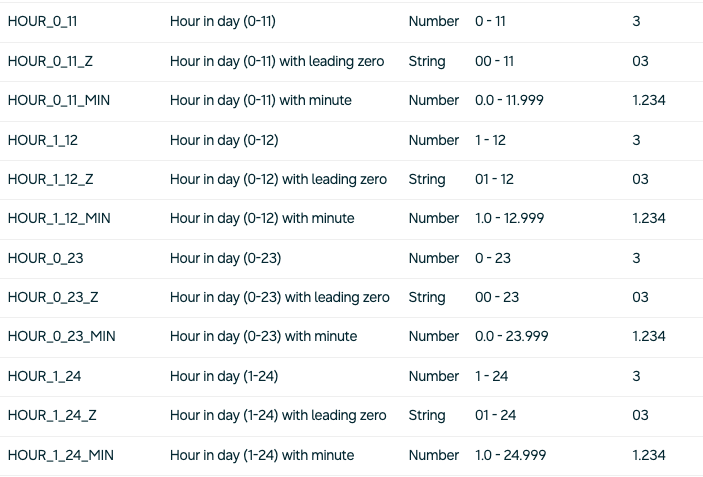
In Watch Face Studio, there are dedicated tags for 0-23 and 1-12.
Watchmaker also appears to have similar tags, but the “adapts to device setting” is not ideal.
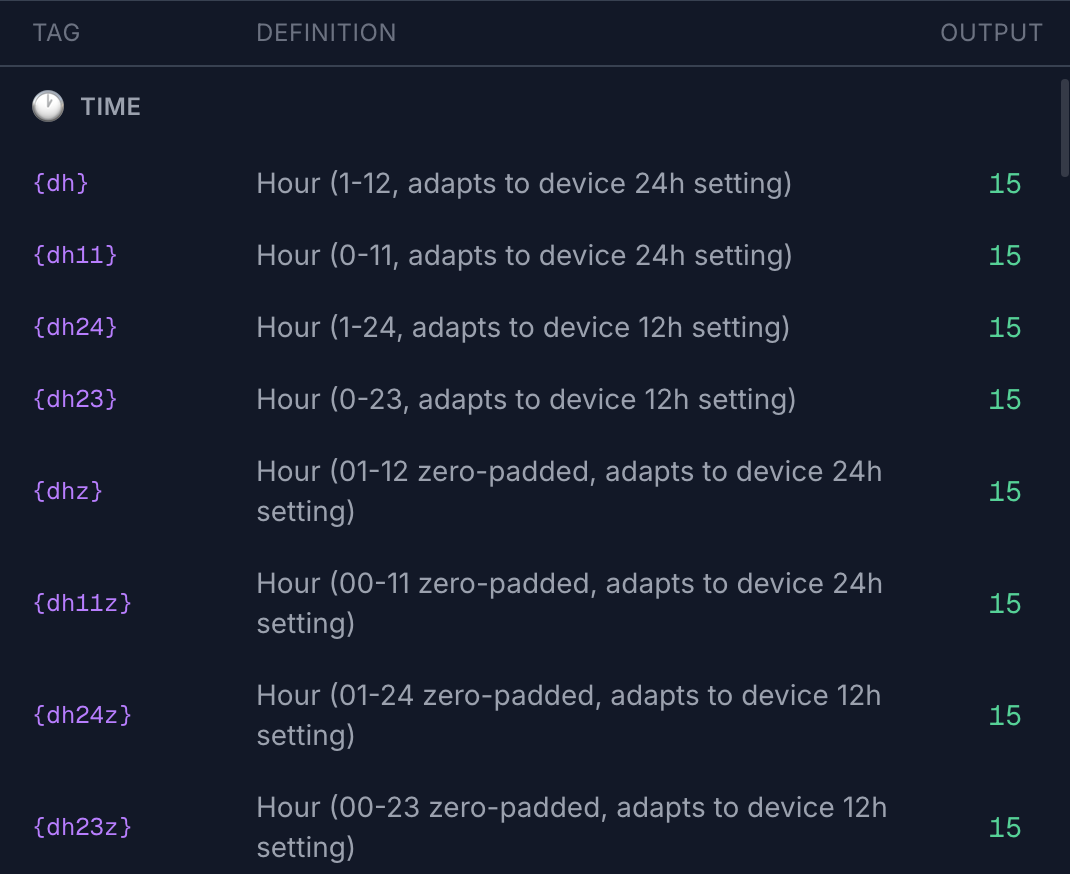
If we use dh11 or dh24 or dh23, it should honour the format. Only dh should adapt to device setting in my opinion. Same applies to the leading zero.
I don’t understand your reply
Isn’t Watchmaker supposed to convert to WFF?
On watchmaker’s list, dh11 Is not showing the 12-hour format it’s showing 15, the 24 hour format
I was hoping Alex would answer me. Thanks for trying to help me but I don’t understand your reply.
I am new to Watchmaker, so still getting familiar with all the tags.
You can set the date/time format on your Mobile phone to 12 hour or 24 hour, and this is synced with your watch. That may fix your issue.
But in my previous reply I was just expressing that regardless of the mobile/watch date/time settings, if add a tag such as dh24 is used, the output should be 1-24, regardless whether the watch is using 12 hour format. Only tags such as {dh} should adapt to the users mobile/watch setting of 12 or 24 hour format.
Hi Furmaniac,
Just to clarify — when WatchMaker converts a face to WFF, it will always respect the user’s device time preference for 12/24 hour display.
Because of that, we’ve made the same adjustment in the Studio display too, so it stays consistent with how the watch will actually show it.
So essentially, if you need a specific format, you have to force either 12-hour or 24-hour output. There isn’t currently an “ignore the user’s time setting” option for WFF conversion.
Alex what do you mean by force the format
All I want to do is display the hour in its AM/PM number
{dh} always did that. Now I see no way to do that except perhaps with this formula
{dh}<13 and {dh}-12 or {dh}
Somebody on here said there’s a new format and Lua doesn’t work, but I think in the opacity field we always used this “and or” format. I think it still works.
I thought Watchmaker was going to convert things like the old {dh} values (1-12) to Google’s format. If my formula would work, I would have to change hundreds and hundreds of code lines on my watches and it’s very hard to change long opacity formulas in the new format.
In any case, will that formula work and is that what I have to do, otherwise please explain.
It depends on your 12/24 hour preference
If you are set to 24 it won’t make any changes but if you prefer 12 it will convert 15 to 3 for example
We added a new tag {dh23i} which ignores your 12/24 hour preference
You could try this instead
So now I think I understand what you’re saying. It would read numbers from 1 to 12 if the WATCH is in a.m. p.m. format
But my PHONE is in AM/PM format, and when I look at the watch face on the phone (Watchmaker app in Studio), it’s showing it in 24-hour format on the Watchmaker app. That’s why i was confused!
But I just discovered that there’s time format in Watchmaker, something I didn’t know. Now I changed it and it works.
The reason I couldn’t test this on my watch is that I have deliberately never updated the watch. I continue to use the old format and all the faces that I love with all their features.
I know many people have said that you can’t load more than one face at a time in the new format so I’m afraid to go to the new format.
Other Watchmaker users are using my watch faces and this is why I want to understand the system. I know eventually I’ll have to upgrade on my watch.
The new editor is so much worse than the old one. I really can’t stand it. The opacity field scrolls, but you can only see two lines. I have long opacity fields and the keyboard at the bottom of my screen opens up and it blocks part of that. You used to be able to have it in like a paragraph format
The layers have letters so big that I can’t distinguish one layer with text from another it used to be so clear. It seems that the layers are much smaller now.
If you had to build a new system, Watchmaker Studio, why didn’t you do it in the original format which was so loved by all your subscribers?
I don’t know how to copy a watch face anymore. It also seems that some faces have many duplicates. I think it’s a mess! Sorry Alex, I know you’re trying to be kind and answer all of us, but I think many others must feel this way.
Regarding time format, there is a setting in the phone app where you can choose 12/24 hour mode — the {dh} tags will follow that setting in Studio preview.
On the actual watch face, it will follow the watch’s own 12/24 hour preference.
Thanks as well for the feedback on the new editor. We’ve already made a few improvements based on similar feedback from creators.
The text sizing in layers and the formula editing experience have both now been updated in the latest version, which should help a lot with longer expressions.
Part of the reason we built Studio was to create a more consistent editor across mobile and desktop, and to align things much more closely with how WFF/native watch faces actually behave. That has also made it much easier for us to roll out new features faster across all platforms instead of maintaining completely separate systems.
Since Studio launched, creators have already built nearly 5,000 watch faces with it, and we’ve got a lot more features planned.
We did try to keep the mobile Studio experience as close as possible to the original editor, while still modernising the underlying system. We know long-time creators had very established workflows, so we’re actively taking on feedback and continuing to refine things with each update.
I just looked at the new version of the editor and yes it is much improved, so now I can say… Alex, I am so appreciative of the time and effort you give here to your valued users.
As I once informed you, the people who write answers on Play Store don’t know what answers to give and they are far inferior to what you do here. Once in awhile, you should go on Play Store and take a look again.
Finally, …
… is it easier and less time consuming to send watchfaces to the new watches now?
Can you send more than one watch?
Appreciate that — and thanks for giving the newer version another look.
And yes, transferring to the newer watches is much smoother now than it was originally. We’ve spent a lot of time improving reliability and reducing the amount of setup needed.
You can also store and switch between multiple watch faces on the newer watches now, so it’s a much closer experience to the classic WatchMaker workflow than the early WFF versions were.