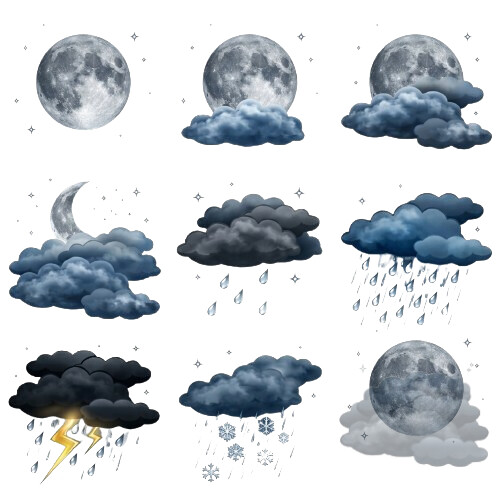
The weather icons in Watchmaker do not always match the weather condition name. Sometimes, they are fine - other times, not at all. For example - my condition right now is “Partly Cloudy”, but the icon is full sun. Is it possible that 9 images are not enough for all the conditions?
I think there is a Tag for weather station location . Try a test with that . It can help to make sure you are getting data from a reasonably local Station . I note that it does not show on the previews but on the watch fine . May be @AlexCurran can look at this as well when he gets the time .
Hi - yes, there is. I have used it {wl}. It does give me Parrish, FL which is accurate. Of course, this is Florida, so it could be sunny at my house in Parrish and raining down the street in Ellenton. That’s why I tried to use weather icon, weather condition, and current temperature, all from Watchmaker so it wouldn’t be looking at different data. It still gives me a bright clear Sun and says Partly Cloudy - weird.
Are you using the 3x3 sprite sheet icons or images for each icon number ? I have not had much luck playing withthe sprite sheets
I am using the sprite sheets, however, I believe I have found the solution. There are only 9 different icons for {wci}, but apparently quite a few more and different condition names for {wct}. So, I tried changing the tail end from “or 1” (1 is Sunny) to “or 2” - the issue seems to only occur when the weather is some variation of partly cloudy. The other icons and condition names match pretty well. So, we’ll see what happens the next time the weather decides it’s partly cloudy or some other condition that’s not named in the icon file.
You Bending stuff to make it work for you . 
Except I still cannot figure out how to get night time weather icons. I could make my own collections in WFS because it keeps standard with the National Weather Service names and numbers. I only had to use the Weather Is Day (1 or 0) to differentiate day and night.
If you make a icon set of night icons and use this code in opacity
({dtp} > {wsrp} and {dtp} < {wssp}) and 0 or 100
At night and
({dtp} > {wsrp} and {dtp} < {wssp}) and 100 or 0
Daytime
This is how I change weather icons for day and night. At sunrise and sunset
Nice one @MrFalank . I was just about to say I published a component with that formula . I am so glad we have working SR SS tags . I was going to suggest to @Purrstachio2Cat making a component with all the icons as separate layers for day and night . Then it could be imported to any project . A bit of work but well worth it . I have made templates on other platforms but Forget when I start a new project . These components on WM are a fantastic gift to us . Brilliant Idea . Thanks to @AlexCurran .
Thank you. I will give it a try. I think you guys are the reason I am staying with WM rather than going back to WFS out of sheer frustration.
Yes, so a separate batch of icons for daytime and another for night. In WFS I did that by making bitmap fonts with images. I’ll have to figure out how to do it in WM. Thank you.
I just transformed the daytime icons, using AI
That would be great, but this is more programming than I know how to do. What AI? ChatGPT, Anthropic ??? AND, how do you create those 3x3 grids? I have plenty of images to put in them - it’s the how-to where I get lost. Until I figure it out, I’ll just use AMOLED’S Weather Complications. But, I WILL figure it out - I’m too stubborn to let it go.
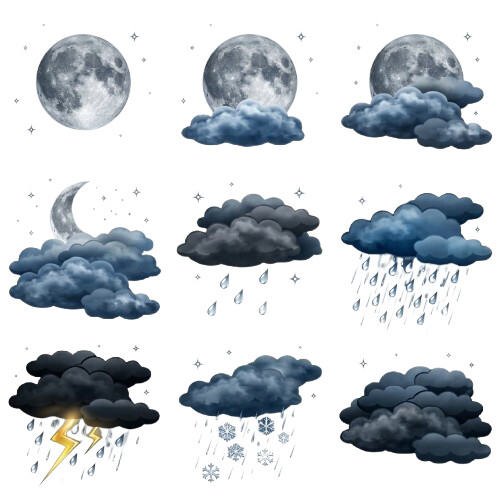
The main problem is that the weather icons and the pointer is geared to the NWS, which is the older weather provider and what is used when running in the Studio. On the WFF formatted watches, Accuweather is used, and it has slightly different weather icon pointers.
Read this thread here, there is a more complete explanation and a solution.
Right - I have an app that eliminates the white background. Thanks.
@MrFalank - is this a Sprite Sheet? How do you make these? Thanks.
I used one of the sheets that’s built into Watchmaker and transformed it with Gemeni
I put in the daytime sheet to Gemeni and told it to make a set of night time icons
For me the Mist icon in these sets is often wrong . I had a quick go on my Tablet . It might be the wrong size compared to the others . I will try add it to the sheet if any one is interested . Oh well I can not post the image on my Tablet . I will try from my Laptop later .