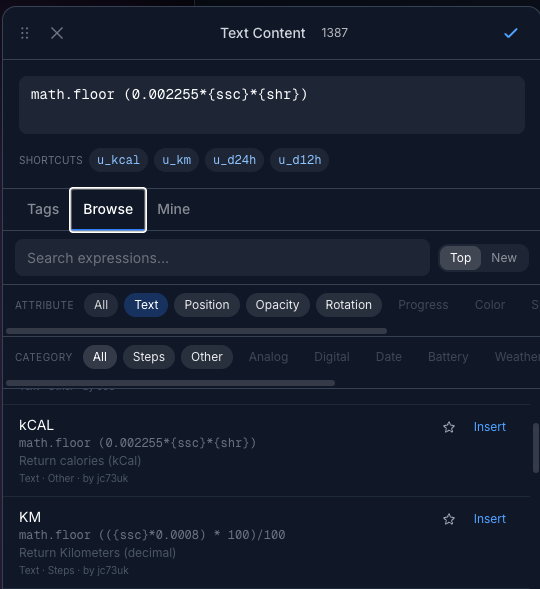
While displaying Km and Kcal is not solved, use these formulas to bind the values to steps:
KM
math.floor (({ssc}*0.0008) * 100)/100
KCAL
math.floor (0.002255*{ssc}*{shr})
While {ssc} is a cumulative, {shr} is an instant value, how would the second formula work?
This is a dynamic formula, as more steps are made more calories are consumed, but taking into account the heart rate.
If you walk slow, heart rate is less then if you run - that elevates calories consumption.
If you want the formula to be cumulative you have to put a fixed value instead of {shr}.
E.g. if you walk, your burned calories value will continuously increase, but with this formula it may decrease if you stop. Am I missing something?
can you explain the problem a little more so we can look at a longer term fix?
No, you are not missing anything.
If you stop your consumption of calories is low, as your heart rate is also lower then when you walk or run.
I think the formula needs to be math.floor(0.0005 * {ssc})
as heart rate is a factor in the formula from Fase so it will go up and down increasing and decreasing the kcal value.
This may be confusing for most (me included), as if it says you burned 1000k then you stop and it says you burn 600k, you might be upset.
Claude says:
On the formula logic itself, yes, you’ve identified a real problem. The issue is that {shr} is instantaneous heart rate, so as HR goes up during exercise the kCal value will jump up, and as it recovers the value will drop back down. That means the displayed kCal would fluctuate up and down rather than accumulating — which isn’t how calories work.
A proper kCal counter needs to accumulate over time, essentially summing small increments each second/minute. WatchMaker doesn’t really support stateful accumulation across ticks natively, so you have a few options depending on what you’re going for:
Option 1 — Use steps only (drop HR)
math.floor(0.0005 * {ssc})
Steps are cumulative by nature, so this always increases. HR adds “intensity weighting” in theory but breaks the monotonic behaviour.
Option 2 — Use HR as a multiplier on a time-based estimate
If you want HR influence, apply it to elapsed time (e.g. seconds since midnight {dse}) rather than steps:
math.floor(0.00004 * {dse} * ({shr} / 70))
This scales kCal by time × relative HR intensity (normalised to a resting HR of ~70). Still not perfect but won’t oscillate wildly.
So maybe 2 variations of the formula… one for Pros… one for everyone else!
The expressions for KM and KCAL do not return any value, they even are marked as  in Studio
Even claude’s formulas may be suspect..
I re-asked it again, as I didnt agree with its first response…
If you ever wanted a very light HR influence without the oscillation problem, you could blend them:
math.floor((0.035 * {ssc}) + (0.00004 * {dse} * ({shr} / 70)))
But honestly for a watch face,
math.floor(0.045 * {ssc})
is the right call — clean, reliable, and accurate enough.
The problem with this formula is that it doesn’t takes into account the steps, Claude is wrong as time is not spending calories per se, steps do spend calories.
Use this formula instead:
math.floor (0.002255*{ssc}*70) it will be cumulative as expected
yeah.. claude does that alot…
You have to triple check it (which I clearly did not.
math.floor(0.045 * {ssc})
The heart rate is important, but a cumulative value is needed, like an integral of HR over time.
The only way would be making a global script that would return the cumulative heart rate average that would reset at midnight, and introducing that average in the formula
But isn’t it already implemented in any OS? The “native” faces show calories as expected. The Watchmaker’s developers should be able fixing this easily. I understand that some less common things like “altitude” have low priority to fix, but calories?
Seems the issue is the new Google face format
I have Ware OS 6 in my OnePlus Watch 4, and have nothing similar to compare with (also have a Garmin).