Sunrise and sunset {wsr} {wss} are not working, is it being fixed? same with phone battery.
Unfortunately this isn’t currently supported by Google’s Watch Face Format. We’ll add support as soon as Google includes it in the specification.
Is it just the {wsr} and {wss} that is not supported on the Pixel phones, or is the phone battery not supported as well?
Google’s new Watch Face Format doesn’t support this yet. We’re working within their new system and will add support as soon as it becomes available.
@AlexCurran Hi sorry I am new here so I hope I am not being out of turn and Rude . Is it possible that these Nop Tags could have a flag like many of the others that do not wor at present on WFF / WOS6 . I look forward to working with the stuff that does . Some very interesting gadgets for the Analogue Dial ticks . I wonder if the Sunrise percent Tags work . I suppose it is a mater of testing them . Thanks for making the Platform available and supporting what seems to be a Vibrant Community .
There was announcement for new tags available in WFF. Looks like these are being provided as internal complications of WatchMaker app. They are not official WFF tags. But this is great way to bring back previously unsupported tags to WFF. You have to enable permissions in the watchmaker app to get the new features.
Thank you @jc73uk . I see you are an important contributor here as well as there . Time zone has caught up with me but can you tell me if this data can be used to manipulate progress bars and images in the WM Face ? I may have to pick this up tomorrow some time . I have only just come here today really .Thanks again .
The {pbl} tag does not work in progress or ring elements for me. Will need Watchmaker team to advise on limitations of use. It may be something they can fix in future updates. Text elements work
{pbl} would not even work in a text field for me . I will check again .
Annoying to see how many things are missing from Google’s precious WFF format they keep forcing on us… hopefully we will see some meaningful updates and additions from them in the future.
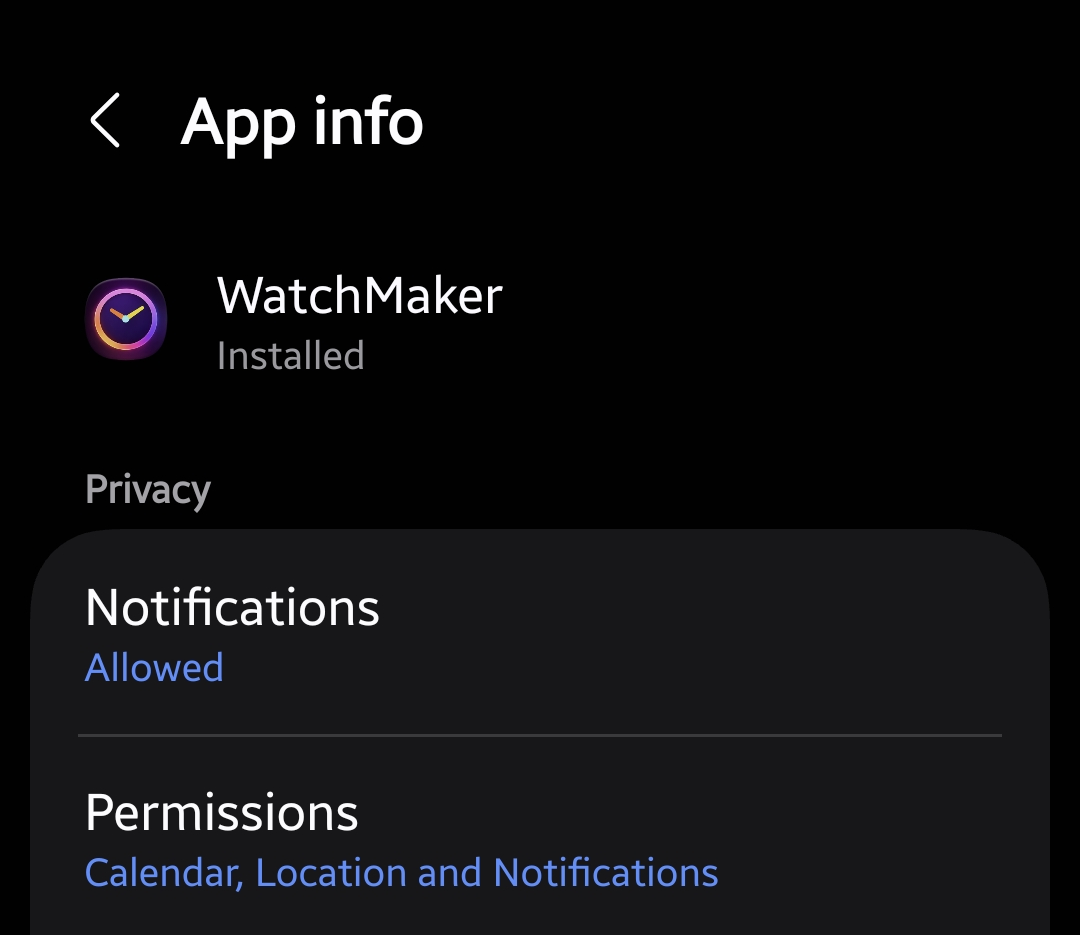
Make sure phone and watch both updated to latest version 10.2.1
Thank you @jc73uk and @AlexCurran . My watch and Phone do not have those permissions and I am not sure how to force an update . I am away right now and the WiFi etc is very poor .
I don’t seem to be able to post images . phone app ver 10.2.1 watch app ver no 10.0.4
Update
OK so I forced an update by getting it from the Google Store on my watch . Not easy I have big fingers . I will check and see what that improves later .
Thanks Both .
On watch swipe bottom up > open google play store > search for watchmaker or find the manage apps link and click update
Much appreciated .
@AlexCurran @jc73uk . This is very exciting . Stole a March on Facer for sure . I think I will continue to make a Nuisance of myself here . Thank you very much for the Succinct information you guys provide . It is an absolute pleasure to me that this stuff works . I look forward to opening my next Topic and Talking to my wife about the Subscription . Which is abut the cost of the Hat she just Bought . 
I wish I could add the Shot of my watch with Mobile power and SR SS .
Lots of exciting new features have been released. Checkout the whats new page https://getwatchmaker.com/studio/updates
It will take awhile to go through, as there is so much to play with!
Thanks Russell! 
And don’t worry about being a nuisance — questions, feedback, and feature requests are exactly what help make WatchMaker better.
There’s a lot more coming too. We’ve been investing heavily in both the mobile app and Studio, and the pace of updates is only increasing. It’s great to see experienced watch face creators like yourself exploring what’s possible.
Looking forward to your next topic and seeing what you create. Thanks for being part of the community and welcome aboard!
And thank you also . On my watch at the moment I am seeing only the phone battery data from when it synced the preview to the watch . No change since then .
I am assuming that the SR SS are string only . Is there a plan to get the SR SS percent working .
{wsr} ans {wss} are working for me.
Have you enabled location permission in watchmaker app? Check location on phone is also enabled.